Find or shoot an accurate Filtration photo: water, air, oil and lab filters, where to source images, licensing basics and a simple decision guide.
Filtration Photo:
What to Look For, Where to Find It and How to Get It Right?
A filtration photo is an image that shows a filter, a filtration photo system or the filtering process itself: a water purifier under a sink, a membrane plant, a HEPA filter on a lab bench. Most people searching for one need it for a specific job, such as a blog post, a product page, a training deck or a tender document.
The trouble is that the search results are crowded. You get cartoon icons, near-identical stock shots and the occasional image that shows the wrong type of filter entirely. This guide helps you pick the right kind of image, source it safely and, if needed, shoot your own.
What Is a Filtration Photo?
Filtration photo is the separation of solids, particles, microbes or other contaminants from a liquid or gas by passing it through a porous medium. A filtration photo shows some part of that process in the real world.
Typical subjects include:
- Household water filters and pitcher filters
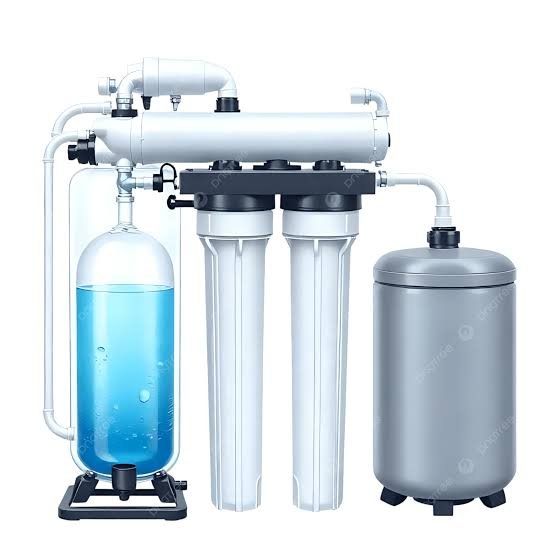
- Reverse osmosis (RO) systems and membrane elements
- Ultrafiltration, nanofiltration and microfiltration units
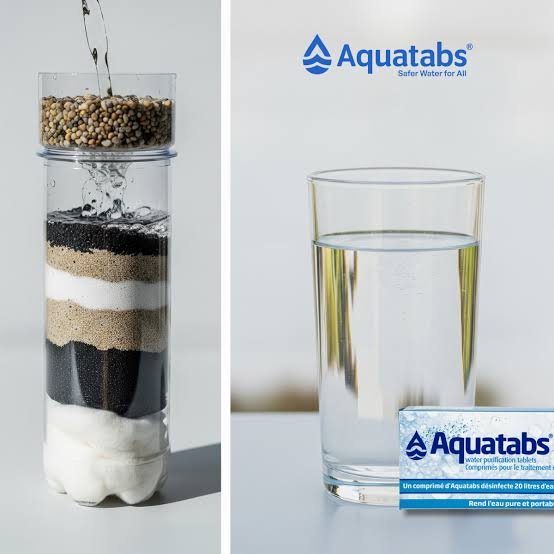
- Sand, gravel and activated carbon beds
- HEPA and HVAC air filters
- Oil, fuel and hydraulic filter cartridges
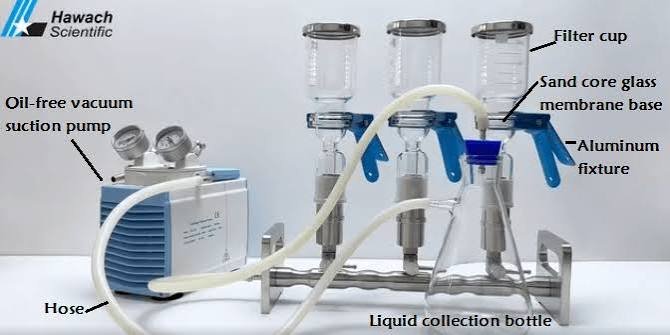
- Laboratory setups such as vacuum flasks, Buchner funnels and syringe filters
- Municipal and industrial water treatment plants
You will also see the same subject called a filter image, a water purification picture or a membrane filtration photograph. They all point to the same family of visuals.
A Quick Note on Photography Filters
The word “filtration photo” also turns up in camera gear, where ND, polarizing and UV filters sit on a lens. Photographers even filter chemicals in film processing. Those are different topics. This article is about images of filtration systems and processes, not lens filters.
Why the Right Image Matters?
A picture often decides whether a reader trusts a page before they read a word. In a technical field, small visual errors add up.
- Credibility. An accurate housing, cartridge and gauge tell an engineer you know the product.
- Understanding. A clear cutaway explains flow direction faster than a paragraph.
- Compliance. An image of a certified product implies the claims that go with it.
- Brand fit. Generic, staged stock can make a serious supplier look careless.
The cost of a wrong image is rarely dramatic. It is usually a quiet loss of trust, which is harder to spot and harder to win back.
Who Needs Filtration Photos?
Different audiences want very different pictures.
| Audience | Typical need | Best image style |
| Homeowners and bloggers | Explain a purchase or fix | Relatable installs, clean product shots |
| Installers and service firms | Portfolio and service pages | Real on-site photos |
| Manufacturers | Catalogues, spec sheets, packaging | Studio shots, cutaways |
| Facilities and plant managers | Maintenance guides, reports | Process photos, before and after |
| Teachers and students | Slides and lab reports | Diagrams, micrographs, lab setups |
| Journalists | Utility or contamination stories | Editorial documentary images |
If you sit in the business-to-business column, accuracy and brand permissions matter most. If you are a consumer or a small publisher, licence clarity and speed usually come first.
Types of Filtration Photos
Product and Studio filtration Photos
A single cartridge, membrane element or housing on a clean background. These work best for catalogues, comparison pages and e-commerce listings.
Installation Filtration Photos
Under-sink RO units, whole-house systems, rooftop HVAC filters and technicians at work. They show scale and context, which is why installers and local service pages rely on them.
Process and Industrial Photos
Pressure vessels, clarifiers, filter presses and pipe galleries inside treatment plants. Archive collections hold older examples too, such as historic photographs of municipal filtration photo plants, which suit history or infrastructure stories.
Macro and Microscope Images
Close-ups of filter media: activated carbon, pleated paper, HEPA fibre mats and membrane surfaces. They help explain why one filter catches what another misses.
Diagrams and Illustrations
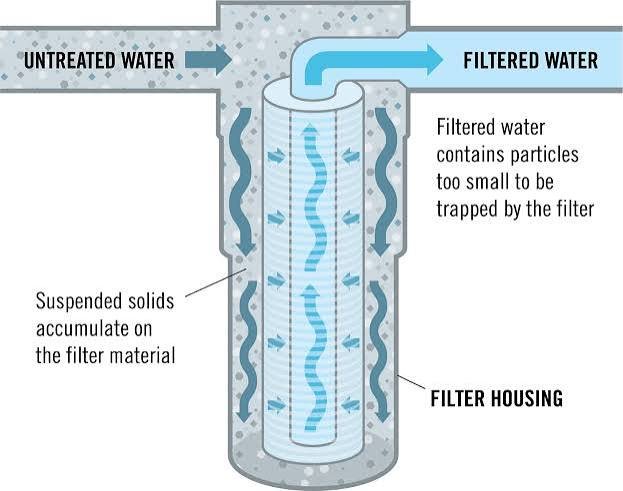
Cutaways and labelled flow charts show stages such as sediment, carbon, RO membrane and remineralization. They are not photographs, but they often explain the process better than one.
Before and After Photos
A clogged filter beside a new one, or cloudy water beside clear water. They are persuasive, so they need to be honest. Never retouch water to look cleaner than it was.
Photo, Diagram or Vector: Which One Do You Need?
Search results for filtration photo are full of flat icons and vectors. They are useful in the right place and wrong in others.
| If you need to… | Choose |
| Show what a real system looks like | Photo |
| Explain how water or air moves through stages | Labelled diagram |
| Decorate a menu, button or infographic | Vector or icon |
| Show pore structure or fibre detail | Macro or microscope image |
| Prove an installation was done | Original on-site photo |
A quick rule: if the reader must decide or learn something, use a photo or diagram. If the image is purely visual rhythm, an icon is fine.
Where to Find Filtration Photos?
There is no single best source. Each has trade-offs.
| Source | Examples | Cost | Watch out for |
| Free stock | Unsplash, Pexels, Pixabay | Free | Licence differences, generic look |
| Paid stock | Shutterstock, Adobe Stock, Getty Images, iStock | Subscription or per image | Recurring cost, same images used elsewhere |
| Public domain and open licences | Wikimedia Commons, government and military galleries, library archives | Free | Check each image’s rights statement |
| Manufacturer media kits | Brands such as Pentair, Culligan, Brita, Donaldson | Usually free with permission | Brand rules and approval |
| Commissioned photographer | Commercial or industrial specialists | Quote-based | Lead time and budget |
| DIY | Your own phone or camera | Time only | Skill, lighting, site access |
Some government photo pages state the licence status plainly, for example marking an image as public domain and asking for photographer credit. That kind of clear statement is exactly what you want to see before you download anything.
When searching, be specific. “Under sink reverse osmosis installation” or “HEPA filter macro” returns far better results than the bare phrase “filtration photo.”
Licensing and Rights, Explained Simply
An image you can see is not an image you can use. Check these points first.
- Commercial or editorial. Editorial images are for news or commentary. They generally cannot be used in advertising or on product pages.
- Attribution. Many Creative Commons licences require you to credit the creator.
- Public domain versus Creative Commons. Public domain has no copyright restrictions. Creative Commons comes with conditions that differ by licence type.
- Model and property releases. Needed when identifiable people or private sites appear, especially for commercial use.
- Trademarks and logos. A visible brand on a cartridge can complicate commercial use.
- Certification marks. Showing an NSF/ANSI mark or a WQA seal implies the product holds that certification. Do not show marks it does not hold.
Save a copy of the licence or receipt with the file. If someone challenges the image later, that record is your protection. This is general information, not legal advice. When the stakes are high, ask the licensor or a qualified adviser.
Pricing:
What to Expect?
Costs vary widely by country, platform and licence type, so treat any number you read online with caution.
- Free stock: no fee, though the selection of technical subjects is limited.
- Subscription stock: a monthly or annual plan with a download allowance.
- Per-image purchase: a one-off fee that rises with resolution and licence scope.
- Commissioned shoot: priced by day or by project, plus usage rights. Get at least two quotes and ask exactly what usage is included.
A sensible budget pattern is free or subscription images for supporting visuals and a commissioned or in-house shoot for the hero images that carry your brand.
Stock, Commission or DIY: A Simple Decision Guide
Work through these questions in order.
- Does the image need to match a specific product or installation exactly? If yes, commission it or use manufacturer images.
- Is it the main image on a product or service page? If yes, avoid generic stock. Shoot your own or buy a distinctive premium image.
- Is it supporting an educational point? Stock, a public-domain photo or a diagram is usually enough.
- Is time or budget the limit? Use free stock or take the photo yourself.
Here is how that plays out in practice:
- A homeowner writing a guide to under-sink filters: free stock plus one original photo of their own unit.
- An installer building a portfolio: on-site phone photos, plus a professional shoot once a year.
- A manufacturer launching a new cartridge: a studio shoot for product shots and a plant visit for process images.
- A teacher preparing a lesson: labelled diagrams and a licensed micrograph.
How to Photograph a Filtration System Yourself?
You do not need a studio. You need patience, clean subjects and good light.
- Plan a shot list. Capture a wide shot of the installation, a mid-range view of the system, a close-up of the cartridge, the label, the gauge and the water flow.
- Clean the subject. Wipe housings and remove fingerprints and old tape. Leave dirt only when the story is a dirty filter.
- Use soft light. A window or a diffused lamp works. Hard overhead light creates glare on glossy plastic and wet surfaces.
- Tame reflections. A circular polarizer reduces glare on clear housings and water. Ironically, this is where photography filters help a filtration photo.
- Choose a natural lens. Something near 35 to 85 mm equivalent keeps proportions realistic. Use a macro lens for membranes, fibres and carbon.
- Steady the camera. A small tripod prevents blur in low-light spaces under sinks or in plant rooms.
- Show scale. Include a hand, a pipe fitting or a pressure gauge so viewers understand size.
- Freeze the water. A faster shutter, around 1/500 second or quicker, captures droplets and flow.
- Edit lightly. Correct white balance and exposure. Do not make water cleaner than it was.
- Export sensibly. Use compressed JPEG or WebP, often about 1200 to 2000 pixels wide for web articles.
On industrial and municipal sites, get permission and a safety briefing first. Never shoot near live electrical equipment or pressurised pipework without authorisation.
Checking a Filtration photo Image for Accuracy
Accuracy is where most stock images fail. Before using any picture, run through this checklist.
- Does the filter type match your text? A pitcher filter on an RO article misleads readers.
- Is the flow direction and stage order correct in any diagram?
- Are pore-size or process terms right? Microfiltration, ultrafiltration, nanofiltration and reverse osmosis are not interchangeable.
- Are any logos, ratings or certification marks accurate?
- Does the image show unsafe practice, such as an unsecured pressurised housing?
Be careful with AI-generated images. They often misdraw components, invent fittings and reverse flow, which makes them risky for technical or compliance-sensitive pages.
Preparing the Image for Your Page
A few small habits make an image more useful to readers and to people using screen readers.
- File name: use under-sink-reverse-osmosis-filter-installation.webp, not IMG_4821.jpg.
- Alt text: describe what is visible, for example: “Technician replacing a sediment cartridge in an under-sink RO system.”
- Caption: add useful context such as the stage, the standard or the replacement interval.
- Placement: put the image next to the paragraph that explains it.
- Size: compress the file and set dimensions so pages load quickly on mobile.
Differences by Country and Region
Filtration looks different around the world, and good imagery respects that.
- Terminology. In some markets “filtration photo” is the common term, in others “water treatment” or “purification.” Match your captions to local usage.
- Standards and marks. NSF/ANSI standards are common in North America, WRAS approval in the UK and CE marking across the EU. Check the rules that apply where you publish.
- Water conditions. Hard water leaves limescale on fittings. Groundwater and municipal supplies call for different systems, so installs look different.
- Reference guidelines. Bodies such as the US EPA and the World Health Organization publish drinking-water guidance that informs how products are described.
- Language. Readers searching in French, German or other languages often prefer images and captions in their own language.
Common Mistakes to Avoid
- Using an icon where the reader needs to see the real thing.
- Mixing up filter types in the image and the text.
- Over-retouching water or filters.
- Ignoring licence terms, especially editorial-only restrictions.
- Showing certification marks the product does not hold.
- Uploading oversized files that slow the page.
- Using the same stock image as every competitor.
Alternatives to a Photograph
Sometimes a photo is not the best tool.
- Labelled diagrams to explain stages and flow.
- Short video or GIF loops to show backwashing or water movement.
- 3D renders for products that are not built yet.
- Infographics to compare pore sizes or filtration photo types.
- Microscope images to show what a filter actually traps.
Frequently Asked Questions
What is a filtration photo?
It is a photograph or realistic image of a filter, a filtration photo system or the filtering process, such as a water purifier, an air filter or a laboratory setup.
Where can I get free filtration photos?
Unsplash, Pexels, Pixabay and Wikimedia Commons are common starting points, along with government and library archives. Always read the licence on each image before downloading.
Can I use filtration photos commercially?
Only when the licence allows commercial use. Editorial-only images cannot be used in advertising or on product pages, and brand logos or people in the frame may need extra permission.
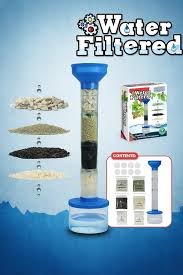
What does a water filtration photo system look like?
Most home systems show one or more cartridge housings connected by tubing, often under a sink. Reverse osmosis units add a membrane housing and a small storage tank, while whole-house systems are larger tanks near the main supply.
How do I photograph a water filter well?
Change block type or style
Move Heading block from position 84 up to position 83
Move Heading block from position 84 down to position 85
Change alignment
Change text alignment
Displays more block tools
Clean it, use soft diffused light, reduce glare with a polarizer, include something for scale and capture close-ups of the cartridge, label and flow.
What image size should I use on a website?
Around 1200 to 2000 pixels wide, compressed as WebP or JPEG, works for most article layouts. Adjust for your design and page speed.
How do I write alt text for a filtration photo?
Describe what is shown in plain language, for example: “Three-stage under-sink filter with sediment, carbon and RO cartridges.” Skip phrases like “image of.”
What does a microscope image of a filter show?
It shows pore structure or fibre layout, which helps explain why different media capture different particle sizes.
Are AI-generated filtration photos reliable?
Not for technical use. They often get components and flow wrong, so have an expert check them or choose a real photo or verified diagram instead.
What is the difference between public domain and Creative Commons?
Public domain images carry no copyright restrictions. Creative Commons images are shared under conditions, such as attribution or no commercial use, that depend on the licence type.
Conclusion
The best filtration photo is accurate, legally safe and matched to what the reader needs to do next. A homeowner may only need a clear example. An engineer needs correct components. A buyer needs trust.
To move forward:
- Decide whether you need a photo, a diagram or a micrograph.
- Pick a source using the decision guide: stock, commission or DIY.
- Confirm the licence and keep a record.
- Check the image for the right filter type, flow and marks.
- Add a descriptive file name, alt text and caption before publishing.
Do those five things and your filtration photo will do more than fill space. They will help readers understand, and trust, what you are showing them.
These information about Projector Rental are gathered from different surveys, medical tests and tech giants like Techradar and more. Our top priority is to provide you valuable information.
For More Details About Different Water Filters Click Here